Here's the link to the new activities for the week:
https://docs.google.com/document/d/1zxDi0WmtGslX1VuwSudfaSvtj0tpiKrRjrzQEn2Tfm0/edit?usp=sharing
On Monday, May 25th, we will be having a Google Meet with our very own mayor, Jim Watson! He will be reading the children a short story about school. We would love it if all the students in our class can join. The meet will be at 1 pm. If your child is able to join, please let them know who Jim Watson is and what his role is for our city. We will be asking the children to tell the mayor what they love about school so a pre discussion at home might be beneficial! An invitation for for the Google Meet was sent out last week. If you did not get it, please send me an email at andrea.rocco@ocsb.ca .
Have a wonderful week and enjoy the weather!
Tuesday, 19 May 2020
Sunday, 17 May 2020
New activities will be posted on Tuesday morning
Due to Monday being a holiday, please check the blog on Tuesday for the new activities for the week.
We hope you are having a wonderful weekend and enjoying the weather!
Monday, 11 May 2020
New activities for the week of May 11th
Here's the link for our Distance Learning for this week:
πππA big Happy Birthday to Olivia! πππ
In case you missed it, here's a video that was made for all you wonderful St. Gabriel families! Thank you for all that your are doing. Please watch!
Here are some pictures from the week:
Tuesday, 5 May 2020
Google Meet - Friday, May 8th at 2pm
Hello!
We will be having a virtual check in on Friday, May 8th at 2 pm. Please use the same instructions that were provided from our last meeting. Looking forward to "seeing" everyone. Please accept the invitation that will be sent to your child. If you do not get an invitation, email me at andrea.rocco@ocsb.ca
Here's the link to our call:
meet.google.com/jjm-tvgy-ibz
Thank you!
We will be having a virtual check in on Friday, May 8th at 2 pm. Please use the same instructions that were provided from our last meeting. Looking forward to "seeing" everyone. Please accept the invitation that will be sent to your child. If you do not get an invitation, email me at andrea.rocco@ocsb.ca
Here's the link to our call:
meet.google.com/jjm-tvgy-ibz
Monday, 4 May 2020
Week of May 4th
Hello!
This week, we will be celebrating Catholic Education Week. Our theme for the week is to "Ignite Hope" in our homes, our community and in our world. As a school community, we have provided activities for the week. Each day, we invite all of our families to demonstrate their hope for others and themselves. We are hoping to gather lots of pictures of the activities that you partake in. Capture and send your hope-filled pictures, videos, art work, stories, etc. to @StGabrielOCSB and tag them #IgnitingHope #ocsbHope to highlight how the students and families at St. Gabriel School are Igniting Hope.
Here's the link to the Education Week activities:
https://docs.google.com/presentation/d/1m-XMU7ygnbzQf_t51jlwLrwkh-j5axFoCbCJa8A4lWw/edit?usp=sharing
Since we had assigned the time capsule activity last week, if you have already done it, please send us pictures so they can be tweeted out. If you were unable to do it last week, feel free to do the time capsule as a family. It will be so exciting to look back in 10 years at all the goodies that were placed inside the box!
Here's the link to Distance Learning for the week. Because of our Education Week activities, we have only included one SPECIAL activity for your child to do this week. Happy Mother's Day to all you amazing moms!
Happy Birthday wishes to Leo and Violetta this week! We hope you have an amazing day!
https://docs.google.com/document/d/13_SYaqA4Y2iCUX_NtsozCsc2HWxk3g_K9wpLJZqJTf4/edit?usp=sharing
Pictures:
Here's Cian's song for our word "yes"! You did a great job, Cian!
https://photos.app.goo.gl/35QJmg3oFhptuHpW7
This week, we will be celebrating Catholic Education Week. Our theme for the week is to "Ignite Hope" in our homes, our community and in our world. As a school community, we have provided activities for the week. Each day, we invite all of our families to demonstrate their hope for others and themselves. We are hoping to gather lots of pictures of the activities that you partake in. Capture and send your hope-filled pictures, videos, art work, stories, etc. to @StGabrielOCSB and tag them #IgnitingHope #ocsbHope to highlight how the students and families at St. Gabriel School are Igniting Hope.
Here's the link to the Education Week activities:
https://docs.google.com/presentation/d/1m-XMU7ygnbzQf_t51jlwLrwkh-j5axFoCbCJa8A4lWw/edit?usp=sharing
Since we had assigned the time capsule activity last week, if you have already done it, please send us pictures so they can be tweeted out. If you were unable to do it last week, feel free to do the time capsule as a family. It will be so exciting to look back in 10 years at all the goodies that were placed inside the box!
Here's the link to Distance Learning for the week. Because of our Education Week activities, we have only included one SPECIAL activity for your child to do this week. Happy Mother's Day to all you amazing moms!
Happy Birthday wishes to Leo and Violetta this week! We hope you have an amazing day!
https://docs.google.com/document/d/13_SYaqA4Y2iCUX_NtsozCsc2HWxk3g_K9wpLJZqJTf4/edit?usp=sharing
Pictures:
Here's Cian's song for our word "yes"! You did a great job, Cian!
https://photos.app.goo.gl/35QJmg3oFhptuHpW7
Monday, 27 April 2020
New activities for the week of April 27
Hello!
It was nice "seeing" you on Friday. We will try and "see" each other every 2 weeks using Google Meet to touch base and catch up.
We hope you all have a great week. Here's the link for this week's activities.
https://docs.google.com/document/d/1hVb0B1aNotI0uOCW5WtuMRsNQhfaplh7EYDpjZAv3lQ/edit?usp=sharing
It was nice "seeing" you on Friday. We will try and "see" each other every 2 weeks using Google Meet to touch base and catch up.
We hope you all have a great week. Here's the link for this week's activities.
https://docs.google.com/document/d/1hVb0B1aNotI0uOCW5WtuMRsNQhfaplh7EYDpjZAv3lQ/edit?usp=sharing
Tuesday, 21 April 2020
Virtual Meeting On Friday April 24th at 2 pm
On Friday, April 24th at 2 pm, we would like to have a virtual check in using Google Meet. We will be sending an invitation to join the "meeting" on Friday so be sure to check in your child's gmail for the link. In order to participate, you will need to login to your child's school board account using the information that was sent out in March. In order to login in, you will need to do the following steps:
- Go to google.ca
- Look for the "Sign In" button in the top right corner. If there is already another account logged in, you can click on the account icon and press "Add account" in the bottom of the drop down menu.
- Carefully type in your student email address, which is your "first name. last name @ocsbstudent.ca".
- Be sure to spell your name carefully, don't add any spaces between anything, and to carefully type in @ocsbstudent.ca (you can make the @ symbol by holding shift and pressing the number 2 key).
- If you type in your email correctly, it will then ask for your password. It is confidential, please do not share it with others.
- When you are logged in, you can go to gab.ocsb.ca to find the student portal or you can go directly there by using this link: Student Portal.
- You can access all your Google products here, such as Gmail, Google Drive, Google Docs, Google Draw, as well as Student Dashboard, RazKids, Zorbits math, and many other student resources.
Given that the students are young, it is important that an adult helps to log them on to "meet" and be nearby while they are using it. Don’t worry! You do not have to be on camera. We would love to see your child’s beautiful smile though!
Below is a link to a Google extension. This extension allows users to see more participants while using a Google Meet with multiple people. In order for students to see all of their peers during the Google Meet, it is essential that you add this extension to your Google Chrome web browser. It is simple to do so.
Google Hangout Extension - Here
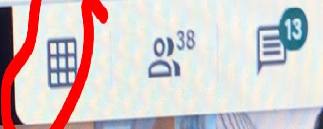
When students are in the meet, there is a button that has 9 small squares inside a large square (called a waffle or grid). If you click that, it will allow students to see everyone at once. Picture is below for your reference.
Chrome Extension Google Meet Grid View to see people better: https://chrome.google.com/ webstore/detail/google-meet- grid-view/ bjkegbgpfgpikgkfidhcihhiflbjgf ic
Chrome extension Nod - Reactions for Google Meet to react to a speaker (raising hand, thumbs up, clap, etc...): https://chrome. google.com/webstore/detail/ nod-reactions-for-google/ oikgofeboedgfkaacpfepbfmgdalab ej?hl=en
Subscribe to:
Posts (Atom)