Tuesday, 21 April 2020

Virtual Meeting On Friday April 24th at 2 pm

On Friday, April 24th at 2 pm, we would like to have a virtual check in using Google Meet. We will be sending an invitation to join the "meeting" on Friday so be sure to check in your child's gmail for the link.  In order to participate, you will need to login to your child's school board account using the information that was sent out in March.  In order to login in, you will need to do the following steps:
  • Look for the "Sign In" button in the top right corner. If there is already another account logged in, you can click on the account icon and press "Add account" in the bottom of the drop down menu.

  • Carefully type in your student email address, which is your "first name. last name @ocsbstudent.ca".
  • Be sure to spell your name carefully, don't add any spaces between anything, and to carefully type in @ocsbstudent.ca (you can make the @ symbol by holding shift and pressing the number 2 key).
  • If you type in your email correctly, it will then ask for your password. It is confidential, please do not share it with others.
  • When you are logged in, you can go to gab.ocsb.ca to find the student portal or you can go directly there by using this link: Student Portal.
  • You can access all your Google products here, such as Gmail, Google Drive, Google Docs, Google Draw, as well as Student Dashboard, RazKids,  Zorbits math, and many other student resources.

Given that the students are young, it is important that an adult helps to log them on to "meet" and be nearby while they are using it. Don’t worry! You do not have to be on camera. We would love to see your child’s beautiful smile though! 

Below is a link to a Google extension. This extension allows users to see more participants while using a Google Meet with multiple people. In order for students to see all of their peers during the Google Meet, it is essential that you add this extension to your Google Chrome web browser. It is simple to do so.
Google Hangout Extension - Here

When students are in the meet, there is a button that has 9 small squares inside a large square (called a waffle or grid). If you click that, it will allow students to see everyone at once. Picture is below for your reference.
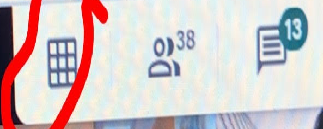


Chrome Extension Google Meet Grid View to see people better: https://chrome.google.com/webstore/detail/google-meet-grid-view/bjkegbgpfgpikgkfidhcihhiflbjgfic  

Chrome extension Nod - Reactions for Google Meet to react to a speaker (raising hand, thumbs up, clap, etc...): https://chrome.google.com/webstore/detail/nod-reactions-for-google/oikgofeboedgfkaacpfepbfmgdalabej?hl=en

Monday, 20 April 2020

Week of April 20th


Hello!

Here's the link to our distance learning for the week.  If you have any questions, please reach out.  


https://docs.google.com/document/d/1QH5xnEntWbwyyNMAsotbD2FviXsy4U_sk67RggBxh4Q/edit?usp=sharing


Mrs. T and I will be sending some information home later in the week regarding a virtual check in with the kids.  We will be using a new program which can be found in your child's student portal.  More details to come!

Have a great week!


Tuesday, 14 April 2020

Week of April 13th

Hello!

A Happy Belated Birthday goes out to some of our friends in the class.  We are sad to have missed it but are sending belated wishes to you all!

Happy Birthday to Cian, Kostya, Jonathan and Alex Y!


Here's the link to this week's distance learning:

https://docs.google.com/document/d/1NUF7VQumpUnCCfDbDhF589t1Gj97uXfV0kAGKV__7V4/edit?usp=sharing

You will find information regarding St. Gabriel's Virtual Spirit Week in this blog post.  Let's have some fun!

Here are a few pictures from last week:


Saturday, 11 April 2020

Happy Easter!

Hello Parents and Guardians,

We want to wish you all a Happy Easter with your family.  We hope that you can take the time to enjoy each other's company and unwind for the long weekend.

Due to the fact that Monday is Easter Monday, we will send out the work for next week on Tuesday instead of Monday.  


Monday, 6 April 2020

Week of April 6th - Activities for the week

Hello!

Welcome to another week of distance learning!  The link below will take you to a shared google doc that outlines suggested activities for this week ahead.  As always, the work is not mandatory and please proceed as your schedule and personal situation permits.  As this is Holy Week, you may choose to treat Good Friday as a "day off" or continue with school routines as you see fit.  This may be a wonderful time to reflect on the difficult journey that Jesus faced and to take heart that ultimately he experienced joy in being reunited with God.  


Wishing you a very Happy Easter and blessings that you and your families are staying healthy and safe!

https://docs.google.com/document/d/1RPts8G3ErjtW8BFdJ_VIb9kEIjv4KXOv0t8lUw7JPL4/edit?usp=sharing


Here are some pictures to make you smile!

Please continue to send in photos of your child at work and at play!  We will post them on the blog each week.  If you have any questions or require assistance with any of the work, please reach out through email.


Monday, 30 March 2020

Week of March 30th - Activities for this week

Week of Monday, March 30th

Language Arts:

Word: he
Letter: “Hh”

Look at the poem below:


The Little Turtle

There was a little turtle.
He lived in a box.
He swam in a puddle.
He climbed on the rocks.

He snapped at a mosquito.
He snapped at a flea.
He snapped at a minnow.
And he snapped at me!

He caught the mosquito.
He caught the flea.
He caught the minnow.
But he didn’t catch me!


  1. Can you butter all the “he”s in this poem?
  2. How many did you find?
  3. Is this a number you can share evenly?  
  4. How many “he”s do you have in your family? Draw a picture of them and write their names.


Journal sk:
  • Write a simple sentence using our word of the week. Remember to use your sounds when sounding out words that you are unsure of. *Don’t forget your finger spacing, an uppercase letter at the beginning and a period at the end of your sentence to say you are all done! Draw a picture to go with your sentence.
Jk:
  • Say out loud all the words that you can think of that have our letter in it (it can start with the letter, end with the letter or have the letter somewhere in the word). Draw a picture of 2 things that start with this letter. Remember to use lots of colours and take your time!

  • Watch storybots letter H
  • Now watch ABC mouse letter H to see if you had some of the same words.

Other Suggestions:

  • Spell our word and letter using playdoh
  • If you have cue cards at home, you can make flashcards with all our words that we have learned so far. Add “he” to a new card and add it to the pile! This is a great activity for an older sibling to help out with.
  • Have fun with chalk on the driveway spelling our word or practicing the letter h. 
  • Go on a nature walk and find things that have an “h” in their name or do a scavenger hunt at home and find things that start with an “h”.

Math:
Maker Monday: 

Make a pattern with loose parts at home. Your pattern can be a shape, colour, size, letter, number pattern etc. Draw a picture of your pattern on a piece of paper. Tell your mom or dad what the “core” of the pattern is. (Remember that the core means the part of the pattern that keeps on repeating. Eg: ABBCABBCABBC The core is ABBC


Tall Tower Tuesday: 

Make a tall tower at home with anything that you think will be sturdy and safe. It can be with stuffies, blocks, soup cans, cereal boxes etc. Count how many objects you used to make your tall tower. Is your tower taller or shorter than you? Draw a picture of your tower. Could you do anything different to make it even taller?


Weather Wednesday: 

Look outside the window and draw a picture of the weather today. On a seperate piece of paper, write down the date and what the temperature is outside. You will need mom or dad to help you with that part. Keep this piece of paper in a special spot. Each week on Wednesday, write down the date and temperature. Can you guess what is going to happen with the temperature each week? Will it get warmer or colder? Why?


Throwing Thursday: 

Grab a ball or stuffie and go in your backyard or in a safe spot where you have lots of room (and you can’t break anything)! Make sure your mom or dad are with you at this time. Throw your ball/stuffie as far as you can. Measure the distance by counting how many of your feet it is to your ball/stuffie. Leave your ball/stuffie in the same place and go back to your starting position. Now hop like a bunny to your ball and count how many hops it took to get to your ball/stuffie. Write these numbers down.


Math Facts Friday: 

Use your fingers, loose parts, cubes or whatever you need to solve these math facts:

Jk:
3 + 2 =

4 + 1 =

5 + 0 =

2 + 4 =

5 - 3 =

3 - 2 =

4 - 4 =


Sk:

10 + 4 =

8 + 2 =

6 + 1 =

7 + 2 =

9 - 5 =

6 - 4 =

10 - 9 =


Brain Teaser Bonus:
How many legs do 4 cats have? Remember to use pictures, numbers and words to help you solve the question.


**Don’t forget to exercise and enjoy all the beautiful things around you! Cosmic Kids Yoga is always fun.


Exercise Challenge:

Go to Gonoodle.com and do the new guided dance called "Roar" with your mom or dad. Have Fun!!! https://app.gonoodle.com/categories/guided-dance

Sunday, 29 March 2020

Zoom Login Instructions

Hello!

We are excited to test out Zoom tomorrow and say hello!  If you click on the link below, you will be able to join our Zoom "check in".  We hope to see you all tomorrow at 10:30 am.

Go to www.zoom.us/join

Andrea Rocco is inviting you to a scheduled Zoom meeting.

Topic: Kinder Check In
Time: Mar 30, 2020 10:30 AM Eastern Time (US and Canada)

Join Zoom Meeting
https://zoom.us/j/820882207

Meeting ID: 820 882 207


Please note that this is not mandatory.  It is just a way for Mrs. T and I to check in and see how everyone is doing and to see the sweet faces that we miss dearly.  If your child is unable to join us, they will not be missing out on important information so please don't worry.